


Feedback

Starting with Relativity Server 2026, Relativity verifies the compatibility of Relativity Application Packages (RAPs) at upload time. When you import a RAP, Relativity reads the build and validation metadata that Server RAP Builder embeds in the package and tells you, before you install, whether the application was built through Relativity's supported build path.
This page describes what that verification looks like in the Relativity user interface: the messages you will see when uploading a RAP, and what to do when an application is flagged as noncompliant. It also previews the build information that Relativity plans to store on the Application object at general availability.
This functionality is being introduced with the Relativity Server 2026 Early Access program. Details of how validation results are displayed may change before general availability.
Starting with Relativity Server 2023, Server platform SDK packages were decoupled from RelativityOne SDK packages and moved to dedicated Relativity Server Artifactory feeds. This created a risk: an application could be compiled against RelativityOne SDK packages and deployed to a Relativity Server environment, potentially causing compilation failures and system instability.
Starting in Server 2026, a RAP that is not built and validated using Server RAP Builder falls outside Relativity's supported build path. Even if such a RAP can be uploaded and installed, Relativity Support and Engineering may not provide troubleshooting assistance for applications built with incompatible SDKs or unsupported packaging methods.
Server RAP Builder is the only mechanism by which Relativity can recognize a RAP as compliant. If an application is compiled against the correct Server SDKs but packaged without RAP Builder, it is still flagged as unsupported in the Application Library and Relativity Applications pages.
When RAP Builder builds a package, it runs a series of schema, assembly, resource file, custom page, target framework, and SDK version checks, and records the outcome in a buildresults.xml file. This file is new: Server RAP Builder adds it inside the RAP package during the build, and a RAP that was not built with Server RAP Builder does not contain one. Relativity reads it at upload time; it does not re-run the validation. For the full list of checks RAP Builder performs during the build, see Validation and Errors.
Applications built entirely within the Relativity front end, with no custom resource files, are not subject to Server RAP Builder or Server SDK requirements. See the compliance messages table below.
In the Server 2026 Early Access release, compatibility verification runs at the Application Library (instance level): when an administrator uploads a RAP to the Application Library, Relativity evaluates the build results and displays a compliance message before the upload completes.
Verification runs only when a RAP is imported into a Server 2026 or later environment. It is not run automatically against existing applications as part of a Relativity upgrade. This applies even to RAPs that were built with Server RAP Builder for Server 2024 or Server 2025: their build results are not evaluated until the RAP is imported into a Server 2026 or later environment. The Create new Application option on the Relativity Applications tab does not trigger verification, because no RAP file is involved.
Planned for GA. At general availability, the same compatibility check will also run at the workspace level on the Relativity Applications tab, when an administrator adds an application using either the Import from File option or the Select from Application Library option. This workspace-level check is not part of the Early Access release.
When you upload a RAP file to the Application Library, Relativity reads the buildresults.xml file from the RAP and displays the Application Compatibility Check pop-up. The pop-up contains:
The pop-up is modal: it blocks the import until you dismiss it by clicking OK. The notice is advisory. It never prevents installation. After dismissing it, click Save to add the RAP to the Application Library.
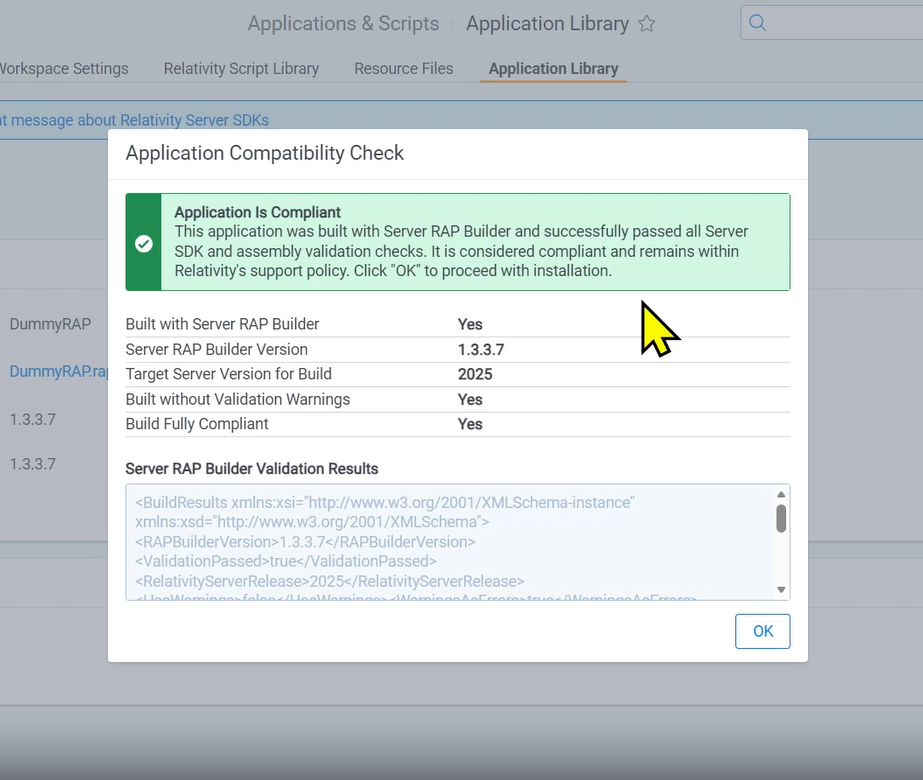
The Application Compatibility Check pop-up for a compliant application.
The message displayed is determined by three values read from the RAP: whether it was built with Server RAP Builder, whether the build produced validation warnings, and the targeted Server version. Under Relativity's support policy, a RAP is treated as current when it targets the installed Server release or the immediately preceding release. For example, a RAP built for Server 2025 remains within the supported window when imported into a Server 2026 environment, so it is considered compliant. This is why the compatibility check shown above returns a compliant result even though the build targeted Server 2025.
| Scenario | Message displayed | What to do |
|---|---|---|
| Compliant. Built with RAP Builder, no warnings, targets the current or last supported version. | This application was built with Server RAP Builder and successfully passed all Server SDK and assembly validation checks. It is considered compliant and remains within Relativity's support policy. Click "OK" to proceed with installation. | Nothing. The application is within the supported build path. |
| Warnings present. Built with RAP Builder, warnings found, targets the current or last supported version. | This application was built with Server RAP Builder but contains compatibility issues identified during validation. It may not fully meet Server SDK and assembly requirements and falls outside of Relativity's support policy. Review the build results below for more details, or click "OK" and then "Save" to proceed with installation. | Review the validation results in the pop-up, then have the developer resolve the issues and rebuild. See Validation and Errors for what each check means. |
| Older target version. Built with RAP Builder, no warnings, targets a version that is not current or last supported. | This application was built with Server RAP Builder and passed validation checks, but it targets an older version of Relativity Server that is not supported for this environment. It falls outside of Relativity's support policy. Review the build results below, or click "OK" and then "Save" to proceed with installation. | Rebuild the application targeting the current Server release. See CLI: build Command. |
| Warnings and older target version. Built with RAP Builder, warnings found, targets a version that is not current or last supported. | This application was built with Server RAP Builder but contains compatibility issues and targets an older version of Relativity Server. It does not meet Server SDK and assembly requirements and falls outside of Relativity's support policy. Review the build results below for more details, or click "OK" and then "Save" to proceed with installation. | Resolve the validation warnings and rebuild against the current Server release. |
| Not built with Server RAP Builder. No build results found in the RAP. | This application was not built with Server RAP Builder and did not undergo compatibility validation. It may not be compatible with this version of Relativity Server and falls outside of Relativity's support policy. Proceed with caution, or click "OK" and then "Save" to proceed with installation. | Rebuild and repackage the application with Server RAP Builder. See the Migration Guide. |
| Frontend-built application. The RAP contains no custom resource files. | This application was built exclusively from the Relativity frontend and contains no custom Resource Files. It is not subject to Server SDK or Server RAP Builder policy requirements. It is considered compliant and remains within Relativity's support policy. Click "OK" to proceed with installation. | Nothing. Frontend-built applications are exempt, including those exported from a pre-Server 2026 environment or from RelativityOne. |
When warnings are present, the pop-up also includes a link to more information on the Relativity Server SDK compliance policy.
Important: not included in Early Access. Everything in this section is planned for the Relativity Server 2026 general availability release and is not part of the Early Access release. It is documented here for future awareness only, and details may change before GA. In Early Access, build and validation information is shown only in the Application Compatibility Check pop-up at upload time; it is not persisted to the Application object or visible in the Application Library list view.
At general availability, Relativity plans to persist the build metadata from buildresults.xml onto the Application object when a RAP is uploaded, so that the compliance posture remains visible after installation.
The following fields will appear on the Application Information tab of the Application object layout:
| Field | Possible values | Source |
|---|---|---|
| Built with Server RAP Builder | Yes, No, Not built with Server RAP Builder, Frontend Built RAP | buildresults.xml
|
| Built without Validation Warnings | Yes, No, Not built with Server RAP Builder, Frontend Built RAP | buildresults.xml
|
| Target Server Version for Build | Server release (for example, Server 2026), Not built with Server RAP Builder, or N/A - Frontend Built RAP | buildresults.xml
|
| Server RAP Builder Version | Version string from the build, or N/A - Frontend Built RAP | buildresults.xml
|
| Build Fully Compliant | Yes, No, Not built with Server RAP Builder, Frontend Built RAP | Determined by Relativity at upload time |
Build Fully Compliant is the only field not read directly from buildresults.xml. Relativity computes it by combining the build results with the installed Relativity Server version of the environment: an application is fully compliant when it was built with Server RAP Builder, produced no validation warnings, and targets the current or last supported Server release for that environment. The same RAP can therefore be fully compliant in one environment and not in another.
Screenshot pending. The Application Information tab, showing the five Server RAP Builder build fields, will be added when the general availability work is complete.
The Application object layout will include a tab titled Server RAP Builder Validation Results. This tab displays the full set of validation check results recorded during the RAP build, the same detail shown in the Application Compatibility Check pop-up.
If the application was not built using Server RAP Builder, the tab displays the following message in place of results:
This application was not built using Server RAP Builder, so no build results are available.
Screenshot pending. The Server RAP Builder Validation Results tab will be added when the general availability work is complete.
The Application Library list view will include the following columns so administrators can review compliance across all installed applications at a glance:
Applications uploaded before Server 2026 will show empty values in these columns, because the compatibility check runs only when an application is imported into a Server 2026 or later environment. Values will not be backfilled for existing applications as part of an upgrade, even for RAPs that were built with Server RAP Builder for an earlier release. To populate the fields, import the application's RAP into the Server 2026 or later environment.
Screenshot pending. The Application Library list view, showing the five compliance columns, will be added when the general availability work is complete.
If an application you rely on is flagged with a warning message, the resolution always happens on the build side, not in Relativity. The developer of the application should:
relsvr-rap build with --relativity-server-release set to the target release so that SDK versions are validated against the correct release list. See CLI: build Command and Getting Started.If you are migrating from manual packaging or the Publish to Relativity tool, see the Migration Guide.
Can I still install an application that is flagged as noncompliant? Yes. The compliance notice is advisory and does not block installation. However, noncompliant applications fall outside Relativity's supported build path, and Relativity Support and Engineering may not provide troubleshooting assistance for issues related to them.
Does this apply to applications built in the Relativity front end? No. Applications built exclusively from the Relativity front end with no custom resource files are exempt and are treated as compliant. This includes frontend-built applications exported from a pre-Server 2026 environment or from RelativityOne.
Where can I see an application's compliance status after installation? In Early Access, compliance information is shown only in the Application Compatibility Check pop-up at upload time. At GA, Relativity plans to persist the build information to the Application object and surface it in the Application Library list view. See the preview section above.
An application was compliant in one environment but not in another. Why? The Build Fully Compliant value depends on the Relativity Server version installed in each environment. A RAP targeting Server 2025 may be within the supported version window in one environment and outside it in another.
| Guide | Use it for |
|---|---|
| Overview | What Server RAP Builder is and the Server 2026 requirements. |
| Getting Started | Installing RAP Builder and building your first RAP. |
| CLI: build Command | Full reference for the build command, including --relativity-server-release. |
| Validation and Errors | What is actually validated during a build, and how to resolve each error. |
| Troubleshooting | Resolving common build issues. |
| Migration Guide | Moving from manual packaging or the Publish to Relativity tool. |
